Elysia / ElysiaJS
Why is ElysiaJS fast? Inside its route-specific handlers
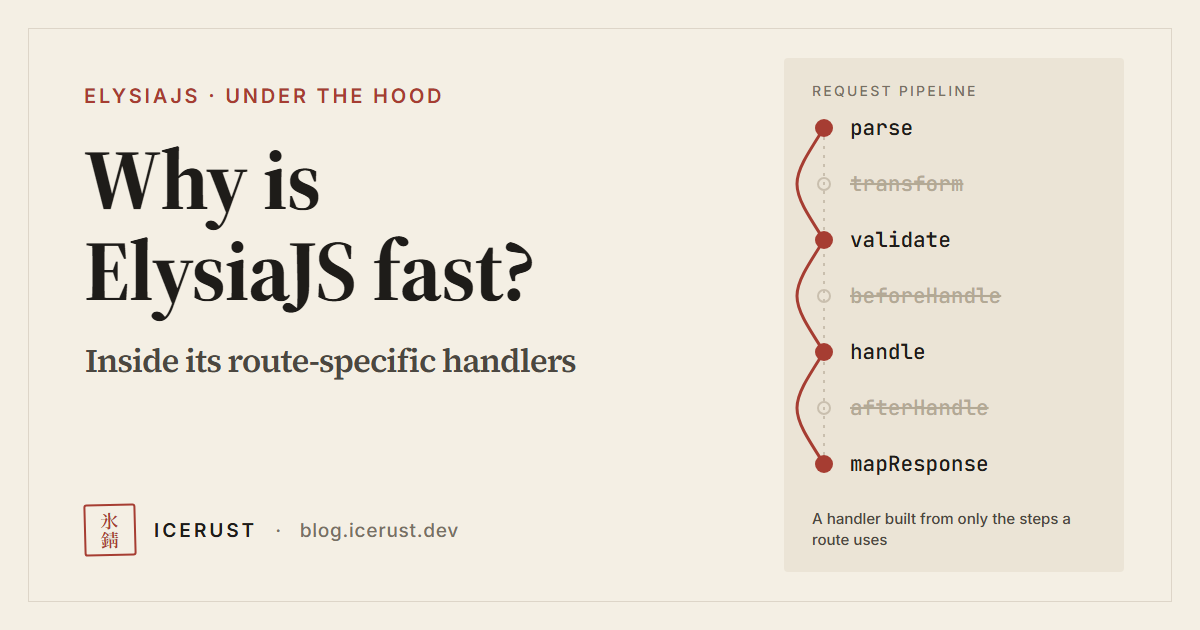
ElysiaJS is getting ready for version 2.0.0, and a beta is already available to try. While we wait for the stable release, I’d like to look at the mechanics behind its speed.
Have you ever wondered why ElysiaJS is fast?
One reason is that Elysia works out what each route needs to do, then generates a request-handling function that contains only the steps that route uses. When a request comes in, there is less work to do. This article looks at what Elysia reads from our code, and how it uses that information to build the function.
The idea combines static analysis with dynamic code generation (generating code at runtime), as described in the paper Elysia: Optimizing JavaScript Web Framework, published in the proceedings of the ACM/SIGAPP SAC 2024 conference. In this article, we’ll work through these ideas step by step using an example route and Elysia’s own code.
The code discussed here is based on Elysia 1.4.30, and the source-code links are pinned to that version so you can check them. Build-time code generation, or build-time AOT, refers to Elysia 2 beta and is covered separately in the relevant section, because the details differ between versions.
In this article — read in order, or jump to the part you’re interested in.
- How does a framework handle a request?
- What does ElysiaJS do differently?
- Sucrose: reading code before it runs
- From analysis to a route-specific handler
- JIT vs AOT: when does Elysia build the pipeline?
- How does Express 5 differ?
- Building handlers costs time and memory
- How much faster will a real app be?
To see where Elysia cuts work, let’s start with the steps a framework like Express or Fastify goes through when it receives a request.
How does a framework handle a request?
Besides matching the HTTP method and path, handling a request may involve other steps before and after calling the handler, such as parsing, validation, hooks, error handling, and preparing an HTTP response. Which steps actually run depends on the framework, middleware and app configuration. For example, Express requires us to add input validation through our own code or middleware. Each request may therefore spend time and resources on these steps, even when the business logic is only a few lines.
Each framework orders this work differently. Look at the diagram below: Express calls middleware in the order we registered it, while Fastify has a predefined set of core steps and lets us add code through hooks at each stage.
Express · in registration order
next(). Error paths are omitted.Reference: Express: Using middleware
Fastify · predefined lifecycle
onResponse runs after the response has been sent.Reference: Fastify: Lifecycle
Part of the work is preparing data for the handler, such as parsing the query string, decoding a JSON body, or turning headers into an object in the context. Each step costs a different amount of time and resources — compare reading headers the HTTP server has already prepared with parsing a body into a form the handler can use.
Suppose that, after a route is selected, we have a central function that prepares every piece of data before calling the handler. The following code is a model for comparing ideas, not the implementation of Express or Fastify:
async function centralHandler(request) {
  const context = {
    request,
    body: await parseBody(request),
    query: parseQuery(request.url),
    headers: prepareHeaders(request.headers),
    cookie: parseCookies(request.headers.get('cookie'))
  }

  return mapResponse(await routeHandler(context))
}
The function names stand in for each step. We assume parseBody handles requests without a body and mapResponse turns the handler’s result into a response. Routing, validation and error handling are left out so we can focus on preparing the context.
If the handler only reads query.id, this central function still runs the body, headers and cookies preparation steps every time. Cutting out unneeded work can therefore reduce both CPU time and object allocation per request.
Real frameworks already have ways to avoid this work, such as attaching middleware only to specific routes, or parsing a value only when it is read. We’ll come back to compare with Express 5 after looking at Elysia’s mechanism.
Elysia’s approach is to use what it knows about the route to decide up front which steps the request pipeline needs.
What does ElysiaJS do differently?
In modes where code generation is enabled, Elysia analyzes the handler and hooks, then combines the result with the schema, HTTP method and adapter to assemble that route’s request pipeline. The conditions that pick these steps live in compose.ts in version 1.4.30.
Suppose we have an API that receives /user?id=42 and responds with the value of id:
import { Elysia } from 'elysia'

const app = new Elysia()
  .get('/user', ({ query }) => query.id)
For /user?id=42, this example returns '42' as a string, because no schema converts id to a number. The code only shows reading a value from the query so the flow is easy to follow. A production API should define validation and state clearly how it handles a missing id.
With no hooks or schema that need headers or cookies, this route doesn’t need to prepare that data in the context. Body parsing also depends on the HTTP method: the Elysia version referenced here never generates a body-parsing step for GET and HEAD. So skipping that step in this example is not the result of static analysis alone.
What does a query-only route need to prepare?
Central function (model)Runs every data-preparation step
GET /user?id=42
- body
- query Used ✓
- headers
- cookies
Handler reads query.id
Elysia pipelinePrepares only the data this route uses
GET /user?id=42
- query Used ✓
Handler reads query.id
The handler gets the same data it needs, with less preparation
This diagram compares a function that runs every step with a pipeline that runs only the steps each route needs. It shows which steps can be skipped, but not how many times faster it is.
So how does Elysia know what the handler needs?
Sucrose: reading code before it runs
Sucrose is Elysia’s helper that reads a function’s code and records “which parts of the data this function uses”, so Elysia can prepare the right data for that route.
Let’s go back to the same route:
app.get('/user', ({ query }) => query.id)The function ({ query }) => query.id is the handler, and the context is the object Elysia passes to the handler for working with the request. Here, { query } pulls just the query data out of the context.
When a request for /user?id=42 arrives, Elysia has to turn the text id=42 in the URL into something like { id: '42' } before the handler can read query.id. But how does Elysia know it needs to prepare the query? That’s Sucrose’s job.
Step one: turn the function into text and read its code patterns
JavaScript lets you call toString() on a function. Let’s pull the handler out to see it clearly:
const handler = ({ query }) => query.id

handler.toString()
// gives text along the lines of "({ query }) => query.id"
Sucrose inspects this text and finds that the parameter destructures query, so it records a result like this (only some fields shown):
{
  query: true,
  body: false,
  headers: false,
  cookie: false
}
true means the data should be treated as needed, either because the code uses it directly or because the analysis conservatively assumes it might be used. false means this analysis has not marked it as needed. In this example, Sucrose can therefore say “query is needed” without calling the handler and without knowing what value a real request will send for id. See the mechanism in sucrose.ts.
This result marks query as used as a whole; it doesn’t mean only the id key will be parsed.
Next step: use the analysis to choose the work
Once Sucrose reports which data the code uses, Elysia feeds that result into the part that builds the request-handling function, in compose.ts. This part also considers other information, such as the schema and HTTP method, to choose which steps the route’s function needs.
The resulting sequence of steps is called a pipeline — for example, prepare query → call handler → turn the result into a response. Elysia generates code that combines these steps into a function for that route.
In this example, if no hooks or schema need headers and cookies, the pipeline doesn’t need steps to prepare those two in the context, so each request has fewer steps to run.
So we can split the responsibilities like this:
- Sucrose: reads the code and reports “query is used”
- The part that builds the request-handling function: uses the analysis to decide “a query-preparation step is needed” and generates code for that step in the route’s function
- When handling a real request: the generated function prepares the query from that request’s URL, then calls the handler
Sucrose also reads the code of hooks, the functions we ask Elysia to call at different stages of handling a request. For example, if a beforeHandle hook reads headers.authorization to check permissions, the combined analysis has to mark headers as used, even though the main handler only reads the query. A schema — a specification of the data’s shape — is another reason the pipeline may need to prepare data for checking.
What if the code doesn’t make it clear what data it uses?
Compare these two:
// Clearly uses query, then passes id along
({ query }) => service(query.id)

// Passes the whole context to service
(context) => service(context)
In the second one, service might read the body, headers or cookies internally. When Sucrose detects the whole context being passed on like this, it assumes the receiving function may use every part of the data it tracks, so there’s less opportunity to cut preparation steps. See the code that detects the context being passed on.
Reading code patterns without calling the function like this is called static analysis. Sucrose only checks which data is used; it doesn’t rely on TypeScript type information and doesn’t understand every JavaScript case. The result also depends on the text returned by toString(). For example, testing Elysia 1.4.30 on Node.js v26.7.0 detected the context being passed on in (context) => service(context), but not in context => service(context). Check the behavior of the built code on the runtime you use. Writing code that makes clear which data it uses helps both human readers and the analyzer.
“Static” here describes how the analysis is done. When it’s done is a separate matter: it may happen while the app is being prepared or when a route is first called, depending on the version and mode. The JIT vs AOT section below explains when Elysia prepares the request-handling function.
From analysis to a route-specific handler
Elysia combines the Sucrose result with the route’s configuration to build a request-handling function for that route.
In this example the handler only uses the query, so the function prepares the query, passes it to the handler, then turns the handler’s return value into a response. The code below models these steps, leaving out async handling for now:
function tailoredHandler(request) {
  const context = {
    request,
    query: parseQuery(request.url)
  }

  return mapResponse(routeHandler(context))
}
This is pseudocode written to explain the flow, not the code Elysia actually generates. It leaves out hooks, validation, error handling and async handler support.
This function wraps our handler and contains only the steps the route needs. Once it’s built, the same function handles every later request to this route.
How does Elysia build a pipeline and reuse it for each request?
Press play to see the sequence, or step through it
View the overview, or press play to see each step
The handler we write
({ query }) => query.idSucrose finds that it uses query, then Elysia builds a pipeline for this route
Requests in
GET /user
- Request 1
?id=42Sent - Request 2
?id=43Sent - Request 3
?id=44Sent
1 Read query
query.id2 Call handler
return query.idThe same two steps,
run on new data every request
Returned
type: string
- Request 1
'42'Done - Request 2
'43'Done - Request 3
'44'Done
Pipelines built: 1
Requests answered: 3
Build the pipeline once for reuse, then read the query fresh on every request
When a new request comes in, Elysia calls the already-built pipeline, creating a new context and reading the query fresh each time. For example, /user?id=43 gives back '43'. Each request is still processed, unlike response caching, which stores answers for reuse next time.
Building a function this way is called code generation. Elysia looks at what data the route uses and which schema or hooks it has, then generates code containing the steps it needs. For example, if the route defines a schema, a step that validates data against that schema is added to the function, and that step still runs on every request to check the incoming data.
JIT vs AOT: when does Elysia build the pipeline?
When Elysia builds the pipeline depends on the version and configuration. This article compares three approaches:
-
Build when the app is built — Elysia 2 beta has an AOT build plugin that generates code for handlers and supported schemas and stores it in the build output. When the app starts, it uses the prepared code. This is called build-time AOT (Ahead-of-Time), according to the Elysia 2 beta announcement.
-
Build while preparing the app — In Elysia 1.4.30, using
aot: truetogether withprecompile: truemakes Elysia build the pipeline when the route is registered. For routes registered during startup, this moves the work ahead of receiving requests, so the first request doesn’t wait for a pipeline to be built. See the code that chooses immediate or deferred compilation and theprecompiledocs. -
Build on a route’s first request — In Elysia 1.4.30, with
aot: trueandprecompile: false, the app waits until the route is called, then builds its pipeline. Later requests use the function that was already built. Waiting to build until it’s needed is called lazy compilation. See how it works in Elysia 1.4.30.
The name aot in Elysia 1.4.30 can be confusing: it turns on route-specific function generation, while precompile decides when that happens. So setting aot: true in this version does not mean code is generated at build time the way Elysia 2 beta’s AOT build plugin does.
Elysia’s configuration docs say
aotdefaults tofalseand describetrueas precompiling every route. But in the 1.4.30 source code,aotdefaults totrue(it can be turned off withELYSIA_AOT=false), and building before accepting requests is controlled byprecompile. This article follows the source code.
In both Elysia 1.4.30 approaches, the function is still built while the app is running: Elysia turns the generated JavaScript into a function with Function(...), the same constructor as new Function(...). Elysia’s internal docs call this mechanism JIT (Just-in-Time). Some routes may be handled specially; for example, a route that returns a constant value may use the runtime’s own capabilities directly.
The JavaScript engine’s JIT, on the other hand, compiles JavaScript to machine code and optimizes it based on information gathered at runtime, as the WebKit team explains for JavaScriptCore. So a finished pipeline doesn’t mean the engine has finished optimizing the code. Even with precompile on, measurements taken right after startup can still differ from those taken after warm-up, that is, after running the code repeatedly before collecting results.
App speed also depends on the runtime. If you compare Elysia on Bun with Express on Node.js, the numbers include differences in both framework and runtime. Using the same runtime shows the framework’s effect more clearly, but the workload and configuration still need to be comparable.
How does Express 5 differ?
With Express 5, we can write a route that receives /user?id=42 and responds with the text 42 like this:
import express from 'express'

const app = express()

app.get('/user', (req, res) => {
  res.send(String(req.query.id))
})
Express calls middleware and route handlers in the order we registered them. Each middleware can send a response right away, or call next() to let the next step run. If we need parsing middleware, we can apply it to the whole app or only to certain routes. See the examples in the middleware guide.
This code doesn’t add middleware for parsing JSON bodies or cookies, so neither is parsed. The query is parsed when we read req.query, because in Express 5 it is a getter that calls the query parser configured for the app (the default changed from "extended" to "simple"). The getter doesn’t cache its result, so the query is parsed again every time req.query is read. See the Express 5 migration guide and the getter’s code in version 5.1.0.
The difference is in how the request-handling steps are prepared. Elysia analyzes the code and the route’s configuration, then generates a function that combines the steps that route needs. Express calls middleware and handlers as we wrote and registered them.
This example shows how each one works, but it can’t tell us which is faster. To measure speed, both first have to behave identically, including when id is missing or sent more than once, such as /user?id=42&id=43, where these two examples respond differently:
| Request | Elysia 1.4.30 (response body) | Express 5.1.0 (response body) |
|---|---|---|
/user |
empty body (query.id is undefined) |
undefined (String(undefined)) |
/user?id=42&id=43 |
43 (no schema declares it an array, so the last value wins) |
42,43 (req.query.id is the array ['42', '43'], converted to a string) |
This table compares only the body, using the examples above and the default query parsers. See the query parser in Elysia 1.4.30 for its behavior. Even when /user?id=42 produces the same body, 42, the Content-Type differs: testing on Node.js v26.7.0 returned text/plain through Elysia’s app.handle() (Web Standard adapter), while Express over HTTP returned text/html; charset=utf-8. The headers also need to match before comparing performance.
Building handlers costs time and memory
Building a request-handling function takes time. If Elysia waits to build it until the route is first called (lazy compilation), the first request has to wait for this step too. Turning on precompile: true makes Elysia do this work at startup instead. So it’s worth measuring startup time, first-request response time, and response time after the app has been running for a while (warm-up) separately.
The generated code has to be kept in memory for later requests, and the code that analyzes and generates functions makes the framework larger. How much extra time and memory this costs depends on the number of routes, schemas and the mode used. Framework developers also have to debug both the code generator and the code it produces. Read more in the overhead section of Elysia’s docs.
Elysia 2 beta’s build-time AOT needs extra care, because the plugin dry-runs the app during the build. Code that runs at app startup may run during this step too — for example, opening a database connection pool — which can keep the process from exiting after the build finishes. So we need to manage those connections, and make sure calls to Elysia APIs, such as registering routes and hooks, are the same at build time and at runtime, matching what the plugin recorded. See the Build Time Environment requirements.
How much faster will a real app be?
If a route can answer with data already in memory and has almost nothing else to do, most of the CPU time spent handling a request may go to framework steps. Cutting those steps can noticeably increase how many requests per second the app can handle, known as throughput.
But if a request spends most of its time waiting on a database or external API, cutting framework work may only make responses slightly faster. Suppose a request takes 20 ms in total, of which 1 ms is spent by the framework. If that part drops to 0.5 ms and everything else stays the same, the total becomes 19.5 ms, a 2.5% reduction. This is just an example calculation, not an Elysia benchmark result.
Things can look different when many requests arrive at once. If the CPU is saturated and requests have to queue, reducing per-request work can also reduce waiting time. So measure both requests per second (throughput) and response time (latency), looking at p95/p99 alongside the average. For example, a p95 of 50 ms means 95% of the measured requests took 50 ms or less; p99 works the same way for 99% of requests.
When evaluating a framework for our API, I check at least four things:
- Do the apps behave identically? They must return the same response data, status and headers to the same specification, and validate input and authenticate under the same conditions, for both valid and invalid input.
- What was tested, and with what settings? Record the framework and runtime versions, adapter, machine specs, number of concurrent requests and connection reuse, so you know how comparable the results are.
- Which phase was measured? Separate startup and first-request times from post-warm-up results, and be clear whether a number measures function calls per second (operations/second) or HTTP requests per second (requests/second).
- What limits the system’s speed? Look at CPU and memory usage, error rate and response time, and check whether the database or the load-generation tool is already at full capacity, since either could be the bottleneck instead of the framework.
I’ve also tested Elysia against Hono with PostgreSQL. If you want an example where every request has to work with a database, give it a read.
What’s interesting about Elysia is that it uses what it knows about each route to prepare work in advance, so less is left to do when a request arrives. We can apply the same idea to our own code: look for work that’s repeated every time, see what can be prepared ahead of time, then measure how much the change actually helps our app.